App testing service · Updated
App testing service: watch real people use your app
TestFi is a pay-per-tester app testing service for Android, iOS and web apps. Verified testers install your build on their own phones, record the screen while they talk, and each session comes back with an AI-scored report. There's no subscription and nothing to integrate.
Three ways to test, priced per tester
Screen recordings
$5.99per tester
The tester records their screen and talks through what they’re doing. You get the video, a transcript (translated to English if they spoke another language), an AI score, and the moments they got stuck, with timestamps.
Good for: A flow nobody outside your team has tried yet, like onboarding, checkout or a paywall.
Written reports
$3.99per tester
Testers use the app, then answer your questions in writing: what confused them, what broke, what they’d change. Each report is AI-scored, so a thin one is easy to spot and reject.
Good for: Checking a fix, or a quick read on one feature.
Google Play closed test
$39.99flat, per app
16 testers join your closed track for 14 days. Each one sends notes on day 7 and day 14, and you get draft answers for Google’s production access form. If fewer than 12 are still opted in on day 14, we run it again at no cost.
Good for: New personal developer accounts that have to clear the 12-tester rule.
How the closed test works →Recordings and written reports usually get their first sessions within a few hours, and most campaigns fill within 48 hours.
Android and iOS app testing
Testers work from whatever link you already have, and there's nothing to install on your side.
- Android: a Google Play listing, a Play testing link, or an APK
- iOS: an App Store listing or a TestFlight public link
- Web: any URL, on a phone or a laptop
You can pick testers by device, country and review history. That matters most on Android, where a layout that breaks on a small, cheap screen never shows up on the flagship on your desk.
What the data says about app usability testing
Across 664 completed sessions on TestFi, the numbers are one-sided: video sessions average a 78/100 AI quality score against 50/100 for written reports, and testers spend 22.8 minutes per video session versus 8.7 minutes for written. Watching someone use your app produces deeper feedback than reading their summary of it.
Read the full written-vs-video breakdown →What does a screen-recorded session look like?
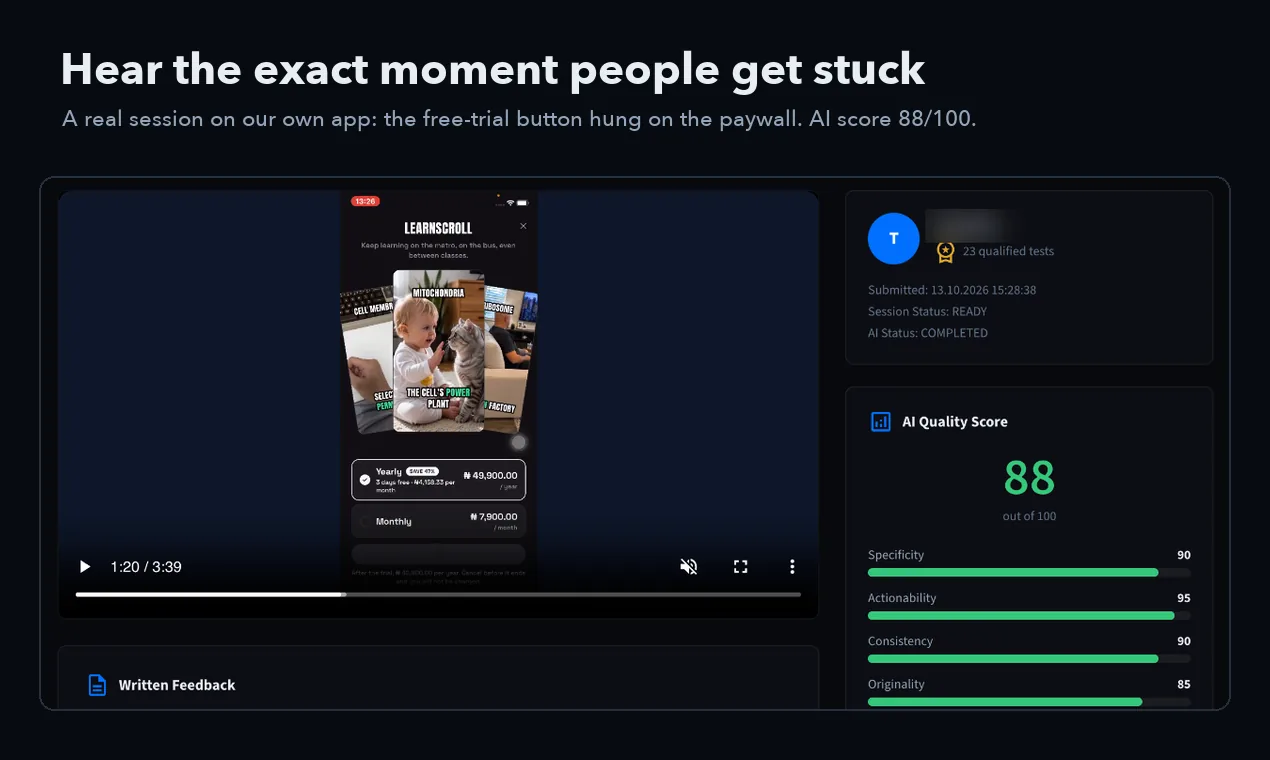
This is one tester trying LearnScroll, our own study app, on their own phone. About a minute in they reach the paywall, tap Start Free Trial, and the button keeps loading. The session page puts that moment at the top of the problems list with its timestamp, 0:56, so you can jump straight to it instead of watching all three and a half minutes. The AI scored the session 88 out of 100: specificity 90, actionability 95, consistency 90, originality 85. Every session also comes with the tester's written notes and a transcript of what they said, translated to English when they spoke another language. A recording like this costs $5.99, and most campaigns get their first sessions within a few hours.
How it works
01
Post a campaign
Paste your link, say what testers should try, choose recordings or written reports, and pick how many testers you want.
02
Testers pick it up
Verified testers usually start within hours and use the app on their own devices.
03
Review the sessions
Each one lands on your dashboard with the recording or report, the AI score, and the problems found, ranked by severity.
How do I get screen-recorded feedback from real users on my app?
Post a campaign on TestFi with a link to your build (App Store, TestFlight, Google Play, an APK or a web URL), say what you want people to try, and pick how many testers. Each tester installs the app on their own phone or laptop, records the screen while talking through what they're doing, and uploads the session.
A recording costs $5.99 per tester, so ten testers come to $59.90. Most campaigns get their first sessions within a few hours and fill within 48 hours.
Each session comes back with:
- the full screen recording, with the tester's voice
- a transcript, plus an English translation if the tester spoke another language
- an AI score across six dimensions and the problems found, ranked by severity
Where can I find beta testers for my iOS or Android app?
Start with the people who already follow what you build: an email list, a Discord server, friends who fit your audience. They're free and they care, though they rarely tell you what's wrong.
On iOS, TestFlight takes up to 10,000 external testers through an email invite or a public link. The first build you send to external testers goes through Apple's beta review.
On Android, Google Play's internal testing track takes up to 100 testers and needs no review; closed and open tracks reach further. A personal developer account created after 13 November 2023 has to run a closed test with 12 testers for 14 days before it can publish.
Reddit testing communities and beta directories like BetaList or BetaFamily are free too, but reply rates swing a lot.
If you need people on the build today, TestFi testers start within hours and record what they do: $5.99 per screen recording, $3.99 per written report, or $39.99 for a 16-tester Google Play closed test.
What TestFi is not
TestFi puts real people in front of your app. It isn't a QA department, and a QA agency or a device cloud is the better buy if you need:
- scripted regression runs against a test plan on every release
- automated tests, or a lab with hundreds of device models
- security, load or performance testing
- an enterprise contract with an SLA
Plenty of teams use both: QA to check the build does what the spec says, and TestFi to see whether people can actually use it.
What does app testing cost?
Most user testing tools sell a subscription and charge for participants on top. TestFi charges per tester and nothing else, so ten screen recordings cost $59.90. Prices below are as of October 2026, from each company's own pricing pages.
| Service | What it costs | How you pay |
|---|---|---|
| TestFi | $3.99 per written tester, $5.99 per screen recording | Pay per tester, no subscription |
| UserTesting | No published prices, sold by quote | Annual subscription |
| Maze | Free plan (1 study a month); panel responses from $15 each | Live app testing on custom-priced Enterprise |
| Userbrain | From $49 a month for 3 panel testers | Subscription; extra testers $45 each on Flex |
| Lyssna | $166 a month billed annually; panel credits $1 each | Subscription plus panel credits |
| BetaTesting | $23 to $39 per credit, or $3,588 a year | Credit packs or Teams plan |
Only need Google's 12 testers? Every paid closed testing service is compared here.
Common questions
What is an app testing service?
An app testing service puts real people in front of your app or website and records what they do and say. Instead of guessing why users drop off, you watch someone hit the problem. TestFi does this with verified testers on their own devices, at $3.99 per written report or $5.99 per screen recording.
How much does app testing cost?
On TestFi, written feedback costs $3.99 per tester and screen-recorded video feedback costs $5.99 per tester, with no subscription. UserTesting does not publish prices and sells by quote. BetaTesting.com sells credits at $23 to $39 each, and Trymata, now part of QuestionPro, shows no public price.
Is this an Android app testing service?
Yes, and it covers iOS and web too. Android testers install from a Google Play link or an APK on their own phones. If you have a new personal developer account, the $39.99 closed test covers Google’s rule of 12 testers for 14 days.
Can testers test iOS apps?
Yes. Share an App Store link or a TestFlight public link. TestFlight takes up to 10,000 external testers. The first build you send to external testers goes through Apple’s beta review, so get that done before you post the campaign.
Do you do QA or regression testing?
Not scripted QA. Testers follow your instructions and report the bugs they hit, and the recording usually shows exactly how it happened. Nobody runs a test plan against every release, though. For that, hire a QA agency.
How is app usability testing different from QA testing?
QA testing checks whether features work as specified: does the button do what the spec says. Usability testing checks whether real people can figure your app out: do they even find the button. TestFi sessions are usability-first, with testers narrating their thinking, but they also surface functional bugs along the way.
How fast do I get results?
Most campaigns get their first sessions within a few hours and fill within 48 hours. Each session arrives with the recording or written report plus an AI score across six quality dimensions, so you can sort the deepest feedback to the top.
Do I need to install an SDK or change my code?
No. You share a store link, TestFlight link, APK, or web URL. Testers install and use your real app on their own devices. Nothing to integrate, nothing to redeploy.
Written feedback or video: which should I pick?
Across 664 completed TestFi sessions, video sessions scored 78 out of 100 on our AI quality engine versus 50 for written, and testers spent 2.6 times longer in the app. Pick video ($5.99) when you are testing a flow for the first time; written ($3.99) is enough for quick confirmation of a specific fix.
Your first testers can start today
Set up a campaign in minutes. First results within hours.